- Project Overview
Kevin Funnell runs online auctions at simstropicalfish.co.uk using the Ultimate Auction Pro plugin for WooCommerce and requires a series of targeted feature enhancements to support more advanced bidding workflows, improve auction management efficiency, and automate key post-auction processes.
This proposal covers five discrete development tasks — each independently scoped, with no cross-dependencies. Each feature can be enabled or disabled on a per-product basis where applicable, ensuring all existing auctions remain completely unaffected.
The five enhancements are:
- Multi-Unit Auction / Multiple Winners
- Automatic Delivery Fee via WooCommerce Shipping & Stripe Auto Debit
- Delivery Date Selection During Bidding
- SKU Display on Auction Dashboard
- CSV Import — Number of Next Bids Field
- Customer Requirements
2.1 Multi-Unit Auction / Multiple Winners
- Single auction listing with a configurable quantity of units available
- All bidders ranked by bid amount upon auction close
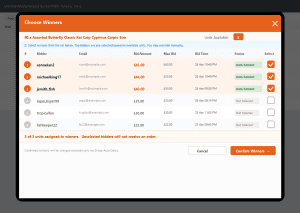
- Admin selects multiple winners (up to available stock quantity) via Choose Winners panel on the Manage Auctions page
- Each selected winner automatically receives a separate WooCommerce order
- Each selected winner automatically receives an individual winner notification email
- All non-selected bidders receive the standard loser notification email
- Remaining stock tracked and updated automatically after winners are confirmed
- Per-product toggle (default: ON) — existing auctions are completely unaffected unless enabled
2.2 Automatic Delivery Fee via WooCommerce Shipping & Stripe Auto Debit
- Delivery fee calculated automatically using the site’s existing WooCommerce shipping zones and methods — no custom flat rate required
- Admin can configure which shipping methods are shown to buyers on the bid form via a plugin settings panel (default: all active shipping methods displayed)
- Buyer selects their preferred shipping method directly on the auction bidding page before placing a bid
- Selected shipping method and calculated cost saved at the time the bid is placed
- On auction close, delivery fee for the winner’s selected shipping method is automatically added to the Stripe Auto Debit charge — bid amount + shipping together in one charge
- Delivery fee written as a proper WooCommerce shipping line item on the order (correct method label and amount)
- If winner selects Collection or Local Pickup, delivery fee is £0 and Stripe charge covers bid amount only
- Per-product toggle (default: ON) — no impact on auctions where shipping is not required
2.3 Delivery Date Selection During Bidding
- Preferred delivery date selector field added to the auction product page during the bidding process
- Date picker is fully independent — built specifically for auction bidding, not reliant on any third-party delivery date plugin
- Selected date saved at the time the bid is placed
- When auction ends and winner is confirmed, winner’s chosen delivery date is written to the WooCommerce order
- Admin can view the selected delivery date directly in the WooCommerce order details page
- Delivery date and shipping method selection are presented together on the bid form as a combined pre-bid step
2.4 SKU Display on Auction Dashboard
Kevin Funnell requires the product SKU to be visible on the auction management pages to aid in quickly identifying listings when managing large volumes of auctions.
- SKU column added to the Manage Auctions admin page
- SKU column added to the Manage User Auctions admin page
- SKU displayed between the Type and Product Title columns on both pages
2.5 CSV Import — Number of Next Bids Field
- Number of Next Bids field is currently missing from the CSV import system — admin must manually update this field on every auction after each import
- Fix targets the auction plugin’s own importer (WooCommerce → Auctions → Import), which Kevin Funnell uses for all auction product imports
- Add Number of Next Bids field to the CSV import column mapping
- Field correctly imports and saves on both new product imports and updates to existing listings
- Updated sample CSV import template to include the new column
- Technical Approach
3.1 Multi-Unit Auction / Multiple Winners
- New per-product meta field: Number of Units Available
- Post-auction bid sorting logic to rank all bidders by bid amount
- Choose Winners panel added to the Manage Auctions page — admin selects winners up to available stock quantity with auto-pre-selection of top bidders
- Individual WooCommerce order and winner notification email generated per selected winner
- Loser notification email dispatched to all non-selected bidders
- Stock quantity decremented automatically on winner confirmation
3.2 Automatic Delivery Fee via WooCommerce Shipping & Stripe Auto Debit
- Plugin settings panel added to configure which WooCommerce shipping methods are shown on the bid form
- On bid form load, WooCommerce shipping engine calculates cost for each enabled method based on the logged-in buyer’s saved address
- Shipping method selector and cost displayed on the bid form — buyer selects preferred method before bidding
- Selected method ID and cost stored in bid/user meta at time of bid submission
- On auction close, winner’s saved shipping cost added to Stripe Auto Debit charge value via hook into Auto Debit calculation
- WooCommerce shipping line item created on the order using the winner’s selected method
- Edge case: if winner has no saved address, bid form prompts to complete profile before bidding
3.3 Delivery Date Selection During Bidding
- Date picker field injected on the auction product page via existing bid form template hook
- jQuery UI Datepicker initialised on page load — date format, locale, and minimum lead time configurable
- Delivery date and shipping method presented as a combined pre-bid selection panel
- Extended AJAX bid submission carries selected delivery date
- Delivery date stored in user meta per auction product at time of bid submission
- On winner confirmation, winning bid’s delivery date written to WooCommerce order meta
- Delivery date displayed in WooCommerce order detail admin view via order meta display hook
3.4 SKU Display on Auction Dashboard
- SKU column definition added to Manage Auctions page between Type and Product Title
- SKU data retrieved from WooCommerce product meta and rendered inline
- Same changes mirrored on Manage User Auctions page
3.5 CSV Import — Number of Next Bids Field
- CSV import column registration extended to include Number of Next Bids
- Auto-mapping function updated to recognise the column header
- Import handler updated to read, validate, and persist the field value for new and existing auction products
- Sample CSV import template updated with the new column header and example value
- Effort — Design & Development
4.1 Multi-Unit Auction / Multiple Winners
-
- Add Enable Multi-Unit toggle and Quantity Available field to auction product metabox
- Build ranked bid list panel with multi-select checkboxes on Manage Auctions admin page
- Build admin JavaScript for winner selection flow and live selected-count indicator
- Build winner confirmation handler — loop winners, create one WooCommerce order per winner
- Wire per-winner winner notification email and loser email for all unselected bidders
- Wire per-winner delivery fee Stripe Auto Debit charge
- Test: single-unit auctions fully unaffected, multi-unit end-to-end, one order per winner, all emails, Stripe charges
- Choose Winners Panel — Reference Mockup
Estimated effort: 38 hours
4.2 Automatic Delivery Fee via WooCommerce Shipping & Stripe Auto Debit
- Build plugin settings panel for admin to select which WooCommerce shipping methods appear on bid form
- Build shipping cost calculation function using WooCommerce shipping engine for buyer’s saved address
- Inject shipping method selector and delivery date picker as a combined panel on the bid form
- Extend AJAX bid handler to save selected shipping method, cost, and delivery date to user meta
- Hook into Stripe Auto Debit charge calculation to append winner’s selected shipping cost
- Build WooCommerce order creation logic: add shipping line item using selected method, write delivery date to order meta
- Build edge case handler: prompt buyer to complete address profile if no saved address
- Test: shipping cost calculated correctly per zone, Auto Debit charge includes shipping, order line item correct, Local Pickup = £0, toggle OFF no shipping applied
Estimated effort: 28 hours
4.3 SKU Display on Auction Dashboard
- Add SKU column definition to Manage Auctions page
- Add SKU data retrieval in auction data loop
- Mirror same changes on Manage User Auctions page
- Test SKU display across live, expired, and scheduled auction views. Confirm blank display for products with no SKU set
Estimated effort: 3 hours
4.4 CSV Import — Number of Next Bids Field
- Add field to CSV import column registration
- Add field to auto-mapping function
- Add processing and validation logic
- Update sample CSV import template
- Test import on new products and updates to existing auction listings
Estimated effort: 4 hours
- Effort Snapshot
| Deliverable |
Hours |
| Multi-Unit Auction / Multiple Winners |
38 |
| Automatic Delivery Fee via WooCommerce Shipping & Stripe Auto Debit |
28 |
| Delivery Date Selection During Bidding |
(included above) |
| SKU Display on Auction Dashboard |
3 |
| CSV Import — Number of Next Bids Field |
4 |
| TOTAL ESTIMATED HOURS |
73 |
| Note: Delivery Date Selection During Bidding is delivered as part of the same development component as the Automatic Delivery Fee feature — the shipping method selector and delivery date picker are presented together on the bid form as a single integrated pre-bid panel. |
- Deliverables
The following deliverables will be provided as part of this engagement:
- Multi-unit auction support — configurable units per product, Choose Winners panel with auto-pre-selection, individual WooCommerce orders and winner/loser notification emails per outcome, automatic stock decrement on winner confirmation
- Delivery fee via WooCommerce shipping — admin settings panel to configure which shipping methods appear on bid form, buyer selects preferred method during bidding, shipping cost added to Stripe Auto Debit charge at auction close, displayed as a proper WooCommerce shipping line item on the order
- Delivery date selection — date picker and shipping method selector shown together on the auction product page, date stored at bid time, written to WooCommerce order on winner confirmation, visible in order details
- SKU columns — added to both Manage Auctions and Manage User Auctions admin pages, positioned between Type and Product Title
- CSV import fix — Number of Next Bids field added to column mapping, imports correctly for new and existing products, sample template updated
- Full testing across all five features
- Tested and deployed on Kevin Funnell’s server (simstropicalfish.co.uk)
- Commercials & Payment
Project Cost
- Total Estimated Effort: 73 hours
- Hourly Rate: USD 45 / hour
- Total Cost: USD 3285

