

 Jul 16, 2026
  12 min read
If you’re comparing WordPress auction plugins, Ultimate Auction Pro and WP Auctions both turn up fast, and they could hardly be more different. Ultimate Auction Pro runs on WooCommerce. It charges the winning bidder automatically, extends bidding to shut down last-second snipers, and can turn a single site into a marketplace with multiple sellers listing their own lots. WP Auctions skips WooCommerce entirely. You install it, drop an auction onto a page, and you’re taking bids in minutes, with a one-time price and nothing to renew each year.
So which one wins? That depends on what you’re actually running. A store selling every day has different problems than a charity running one fundraiser a year. Here’s the full comparison, round by round.
Online auctions aren’t a shrinking corner of ecommerce. The market is on track to hit roughly $14.2 billion in 2026 and keep climbing toward the low $20 billions by the mid-2030s. Almost none of that is happening at a physical podium anymore. It’s happening in browser tabs, and increasingly on phones.
That last part is where plugins quietly succeed or fail. Roughly 8 in 10 auction shoppers browse listings on mobile, and close to half place their actual bids there. A bidding widget that turns into a cramped, mistap-prone mess on a six-inch screen doesn’t generate a complaint. It just loses you the bid, and you never find out it happened.
Then there’s the platform question underneath all of it. WooCommerce still runs around 4.3 million live stores, roughly a third of all detectable online shops, so if you already sell there, a WooCommerce-native auction plugin plugs straight into the cart, checkout, and payment gateways you’ve already set up. If you don’t sell there, all that integration is weight you’re carrying for nothing.
So the real question isn’t which plugin has more features. It’s which one fits the way you already sell.

Ultimate Auction Pro is a WooCommerce auction plugin, and that single fact tells you most of what you need to know about who it’s for. It assumes you already run a store, or you’re willing to set one up, then builds bidding on top of that foundation. Products become auction lots. Your existing checkout, tax rules, and payment gateways carry on doing their job underneath. If WooCommerce is already on your site, this slots into it rather than sitting beside it.
What separates it from most auction plugins is what happens after the gavel falls. It charges the winning bidder automatically through Stripe, Square, Braintree, or Paystack, so you’re not emailing invoices and hoping someone pays. It extends bidding when a bid lands in the closing seconds, which takes sniping off the table. And multi-vendor comes built in through the free WCFM marketplace, so other sellers can list their own lots without you buying a second plugin to make it work.
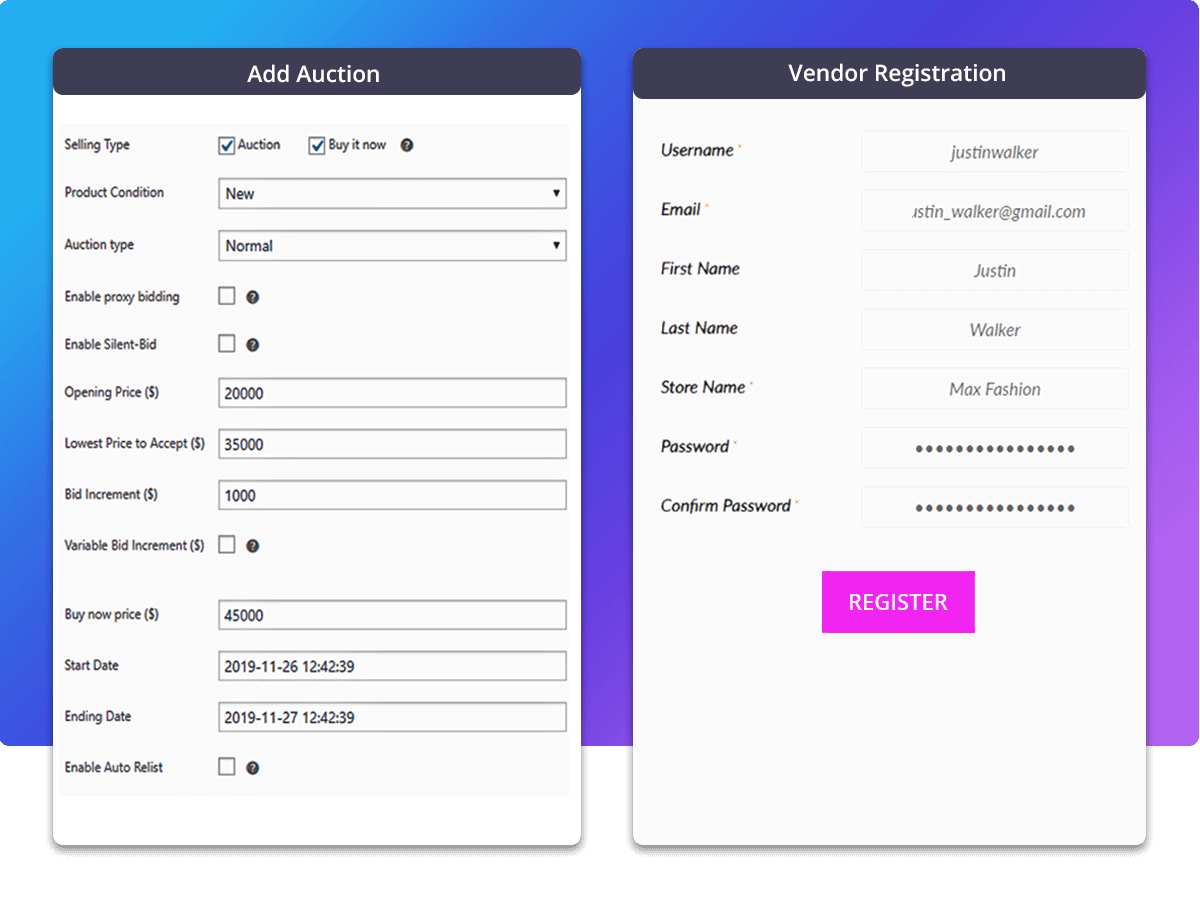
WP Auctions goes the other direction entirely. It’s standalone, so there’s no WooCommerce requirement, no store to configure, and nothing to learn beyond the plugin itself. You install it, drop an auction onto a page or into a widget, and you’re taking bids. It works with the usual page builders and on multisite, and there’s a free version if you want to test the idea before spending anything. More than 81,000 sites run it, charities and local government among them.
That simplicity is the whole product, and it’s a genuine advantage rather than a consolation prize. If you’re running a school fundraiser or auctioning off a few items on a blog, a full WooCommerce install is overhead you’d never touch. You get four bidding engines, including standard proxy and reverse auctions, plus a second-chance offer that lets you go back to the runner-up when a winner falls through. Payment runs through PayPal or bank transfer, and the winner pays manually. You pay once, and nothing renews.

Here’s the full picture, feature by feature. One thing to watch as you read it: the features that make Ultimate Auction Pro worth its price sit in the Business plan, not the $79 Starter.
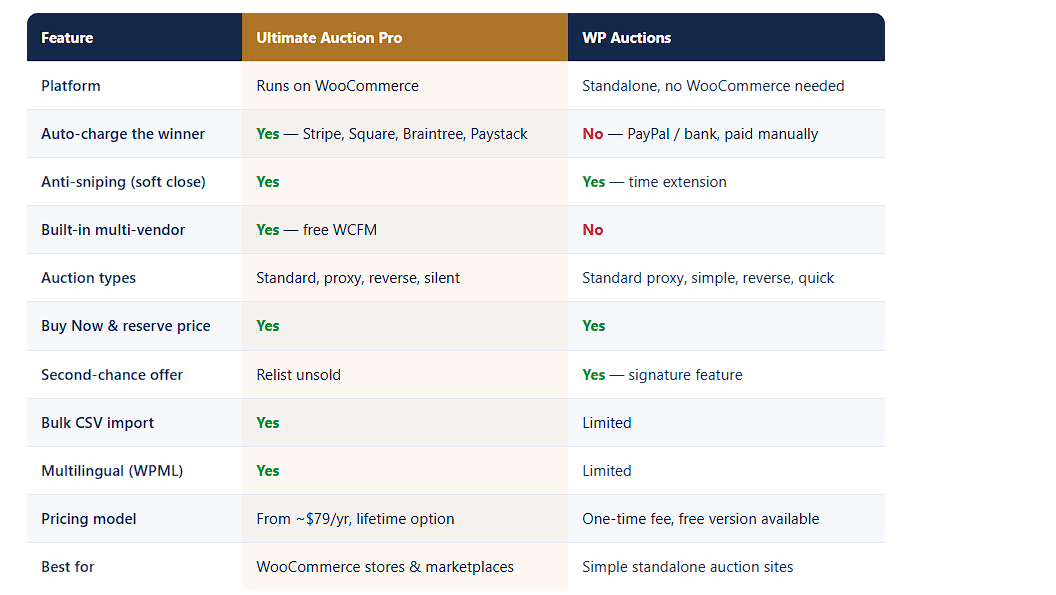
The short version is that these two plugins are built for different jobs. Ultimate Auction Pro automates the parts that cost you money at scale, getting paid, stopping snipers, running vendors. WP Auctions gets you bidding in an afternoon for a fraction of the price. Neither is the wrong answer, but only one fits how you sell.
Feature tables tell you what exists. They don’t tell you what matters. Here’s the honest call on the five things that actually decide this purchase.
Round 1: Getting paid — Ultimate Auction Pro
Every auction seller meets the non-paying bidder eventually. Someone wins at 11 pm, feels differently by morning, and stops replying. Ultimate Auction Pro charges the winner automatically the moment bidding ends, so there’s nothing to chase. WP Auctions sends them to PayPal or bank transfer, and the winner pays manually, which leaves the chasing to you.
Round 2: Stopping snipers — close call
Both plugins extend the auction when a bid lands in the final seconds, so nobody steals a lot at the buzzer. Ultimate Auction Pro calls it a soft close; WP Auctions calls it a time extension. Either solves it. Genuine draw.
Round 3: Multiple sellers — Ultimate Auction Pro
If you want other people listing their own lots and taking a commission split, Ultimate Auction Pro includes the WCFM marketplace at no extra cost. WP Auctions is built around one site owner, so this isn’t something you can configure your way into.
Round 4: Simplicity — WP Auctions
No WooCommerce means no store to set up, no product types to learn, and far less that breaks on update. Install it, drop an auction on a page, take bids. For a school fundraiser, that’s the right tool, and a full WooCommerce install would be weight you never use.
Round 5: Price — depends on you
WP Auctions costs less, full stop. What the extra buys on the other side is automation, and whether that’s worth it comes down to volume. Ten auctions a year, WP Auctions is fine. Ten a week, one unpaid winner covers the difference.
On the surface, this looks lopsided. WP Auctions starts at $39 a year or $79 for a lifetime licence on a single domain, while Ultimate Auction Pro starts at $79 a year or $249 lifetime. WP Auctions is cheaper. That part is simple.
The comparison stops being simple once you check what each entry tier actually includes. Ultimate Auction Pro’s $79 Starter is deliberately basic: simple bidding, bid increments, email alerts, one site. The features this whole comparison turns on, proxy bidding, soft-close anti-sniping, Buy Now, WCFM multi-vendor, CSV upload, and automatic Stripe debit, all sit in the Business plan at $119 a year or $349 lifetime. Auto-debit through Braintree, Square, and Paystack, plus silent and reverse bidding, need Unlimited at $199 a year or $449 lifetime.
So the fair like-for-like is $119 a year against $39 a year, or $349 lifetime against $79 lifetime. Ultimate Auction Pro costs roughly three times more, and it’s worth being clear-eyed about what that buys: automatic payment collection, anti-sniping, and a vendor marketplace, none of which WP Auctions offers at any price. Whether that’s worth 3x depends entirely on volume. If unpaid winners cost you one $400 sale a year, the difference has already paid for itself. If you run four auctions a year for a church raffle, it plainly hasn’t.
One detail worth reading closely on both sides. WP Auctions’ lifetime licence gives you one year of updates and support, then the plugin keeps working but stops receiving them. Ultimate Auction Pro’s lifetime plans include lifetime updates and support, which is why the gap between the two lifetime prices is wider than the yearly gap. Ultimate Auction Pro also carries a 14-day money-back guarantee.
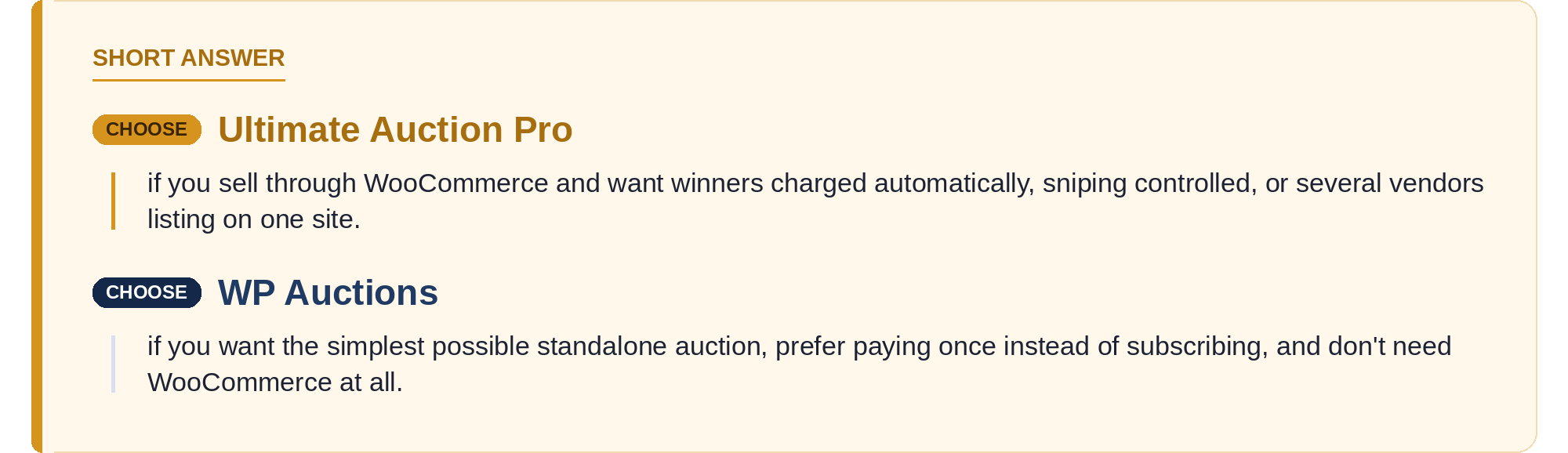
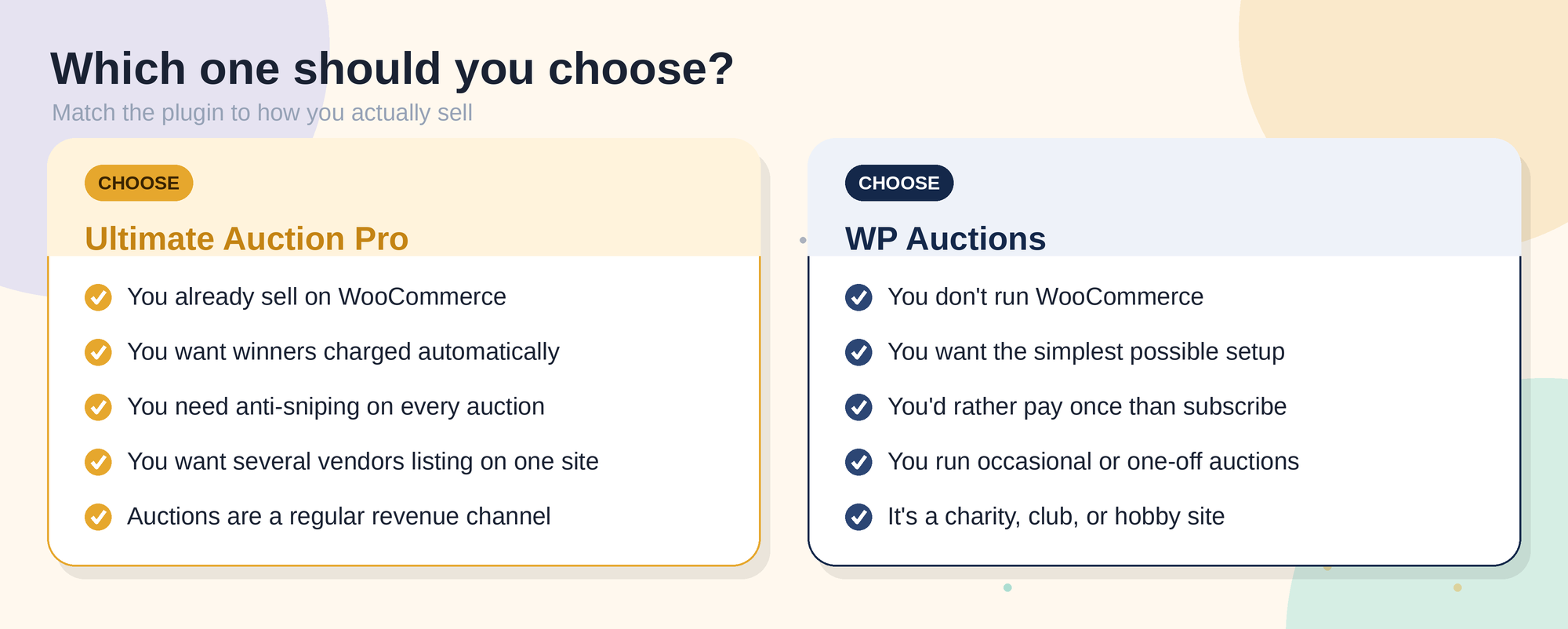
Choose Ultimate Auction Pro if: you already sell on WooCommerce, you want winners charged automatically, you need anti-sniping on every auction, you want several vendors listing on one site, or auctions are a regular revenue channel.
Choose WP Auctions if: you don’t run WooCommerce, you want the simplest possible setup, you’d rather pay once than subscribe, you run occasional or one-off auctions, or it’s a charity, club, or hobby site.
Yes, though it’s a rebuild rather than a migration, so it’s worth understanding before you commit either way.
These two plugins store auctions differently. WP Auctions runs standalone with its own data, while Ultimate Auction Pro builds auctions as WooCommerce products. There’s no button that converts one into the other, so moving means recreating your listings rather than importing them.
In practice, here’s what switching looks like. Let your live auctions finish first, since you don’t want to move anything mid-bid. Install and configure WooCommerce, including your payment gateway, which is the part that takes the longest if you’ve never used it. Then rebuild your listings, and if you have a lot of them, Ultimate Auction Pro’s CSV bulk upload turns that from a week of copying into an afternoon. Historical bid records from the old plugin won’t carry across, so export or screenshot anything you need for your records before you switch.
None of that is difficult. It’s just work, and the amount scales with how many listings you have. Which is the practical argument for thinking about direction of travel now: if you can already see a marketplace or high auction volume in your future, starting on WooCommerce saves you doing this twice.
For anyone selling seriously, Ultimate Auction Pro wins. Automatic payment collection removes the worst recurring problem in running auctions, the built-in marketplace saves you a second purchase and an integration headache, and both arrive without needing to bolt extra plugins together. If auctions are a revenue channel rather than an occasional event, it’s the stronger tool by a clear margin.
But WP Auctions isn’t losing a fight it entered. It’s winning a different one. It’s built for people who want auctions without a store, who’d rather pay once, and who value having fewer moving parts over having more features. For a charity fundraiser, a club, or a blog with occasional lots, it does exactly what’s needed and nothing more, which is a real design achievement rather than a limitation.
Match the plugin to the job. If you’re running a store, take Ultimate Auction Pro. If you just need bidding on a page, WP Auctions will serve you well and cost you less.

1. Is Ultimate Auction Pro better than WP Auctions?
For WooCommerce stores that want automatic payments, anti-sniping, and multiple vendors, yes. For a simple standalone auction on a site without WooCommerce, WP Auctions is the better fit and costs less.
2. Does WP Auctions need WooCommerce?
No. It runs standalone on almost any WordPress site, which is the main reason charities and hobby sites choose it.
3. Can WP Auctions charge the winner automatically?
No. Payment goes through PayPal or bank transfer and the winner pays manually. Ultimate Auction Pro charges the card on file automatically, though that starts on the Business plan.
4. Which is cheaper?
WP Auctions, clearly. It starts at $39 a year or $79 lifetime, against $79 a year or $249 lifetime for Ultimate Auction Pro. Compared like for like on features, the gap is wider still.
5. Does the $79 Ultimate Auction Pro plan include auto-charging?
No. Starter covers simple bidding and email alerts. Automatic Stripe charging, anti-sniping, proxy bidding, and multi-vendor all begin on the Business plan at $119 a year.
6. Do both plugins stop last-second sniping?
Yes. Both extend the auction when a late bid arrives. Ultimate Auction Pro calls it soft close, WP Auctions calls it a time extension.
7. Can I run a multi-vendor auction marketplace?
Only with Ultimate Auction Pro, which includes the free WCFM marketplace from the Business plan up. WP Auctions is built around a single site owner.
8. Which is better for a charity auction?
Usually WP Auctions. It’s cheaper, faster to set up, and a one-off fundraiser rarely needs automatic payment collection or a vendor system.
9. Is WP Auctions’ lifetime licence really forever?
The licence is, but updates and support are included for one year. The plugin keeps working after that, it just stops receiving updates.
10. Can I switch from WP Auctions to Ultimate Auction Pro later?
Yes, though it’s a rebuild rather than an import. You’ll need WooCommerce installed first, then recreate your listings. Bulk CSV upload makes that quick if you have a lot of them.


Nitesh Singh is an e-commerce software architect and the Founder of Inception Software LLP. He has 16+ years of software engineering experience and has been building dedicated auction extensions for the WordPress and WooCommerce ecosystems since 2014. Connect with Nitesh on LinkedIn to track his latest developments in automated bidding tech or read his setup guides on the site.
More articles by Nitesh Singh →




 Easy Setup
 5 Star Support