


 Aug 24, 2026
  9 min read
Proxy bidding lets your system place bids on a bidder’s behalf up to a max they set, while manual bidding means they type in every single bid themselves.
Based on what we’ve seen while working with Ultimate Auction Pro client sites, proxy bidding is generally a good fit for fundraiser and longer-running auctions. For example, if a bidder is interested in an item but cannot continuously monitor the auction, they can enter their maximum amount and the system automatically places the necessary bids on their behalf, allowing the auction to continue without the bidder having to constantly refresh the page. Ultimate Auction Pro supports this through the “Enable Proxy Bidding” option at the auction/product level.
For shorter, single-night or live fundraising events, the requirements can be different. In these cases, clients may prefer a more hands-on/manual bidding approach because they want to actively watch the bids and respond to bidding activity in real time. So, from our experience, the preferred bidding method depends largely on the event format, auction duration, and how actively the client wants to manage the bidding process.
Neither one is better across the board. It comes down to how long your auction runs and how you want bidders to behave: proxy bidding works best for multi-day online auctions since it keeps bids active without anyone babysitting the page, while manual bidding fits live or fast-paced events where you want people watching numbers climb in real time.
Proxy bidding is when you set a maximum amount you’re willing to pay, and the system bids on your behalf, in small increments, only going as high as it needs to beat the current top bid, up to your cap.
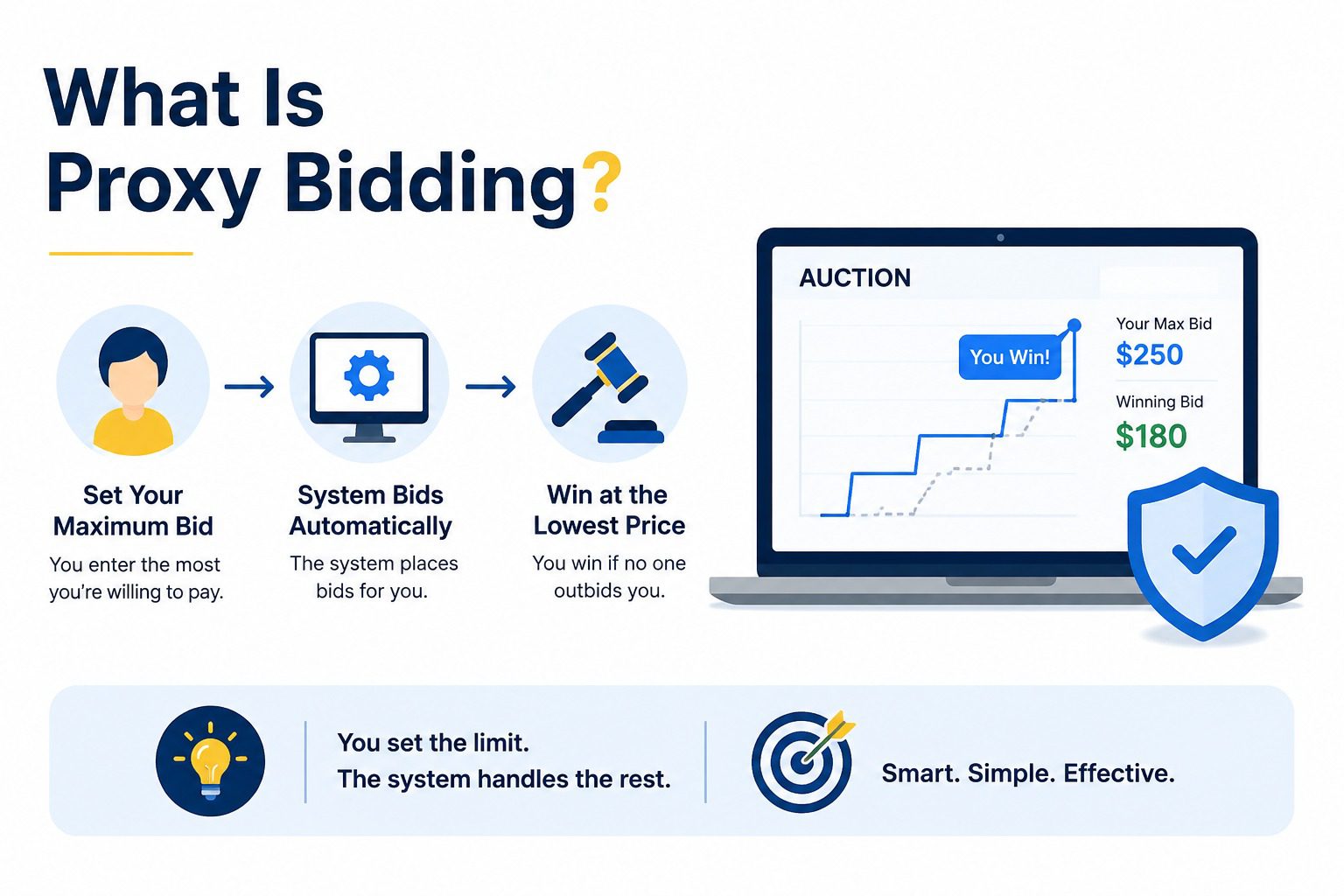
Say the current bid on an item is $50 and you set your max at $200. The system doesn’t jump straight to $200. It bids $55 to take the lead. If someone else bids $60, your proxy bumps you to $65. This keeps going automatically until either the other bidder stops, or your $200 max gets hit and someone else takes the lead.
You never have to sit there refreshing the page and typing in a new number every time someone outbids you. You set your ceiling once, and the system handles the back and forth for you.
Manual bidding is the opposite. There’s no automation involved. You see the current bid, decide what you want to offer, and type in your own number every time someone outbids you.
There’s no cap set in advance and no system acting on your behalf. If you want to stay in the running, you have to be there, watching, and ready to react.
This is still the standard at most in-person gala auctions, where the room can see the bid numbers rise on a screen and the energy of watching people go back and forth is part of the event. Some online auction organizers keep manual bidding for the same reason. It creates visible competition that pushes final prices up, especially in the last few minutes before an item closes.
A proxy bid is the maximum amount you’re willing to pay for an item, entered once, that the system uses to bid for you automatically as the auction goes on.
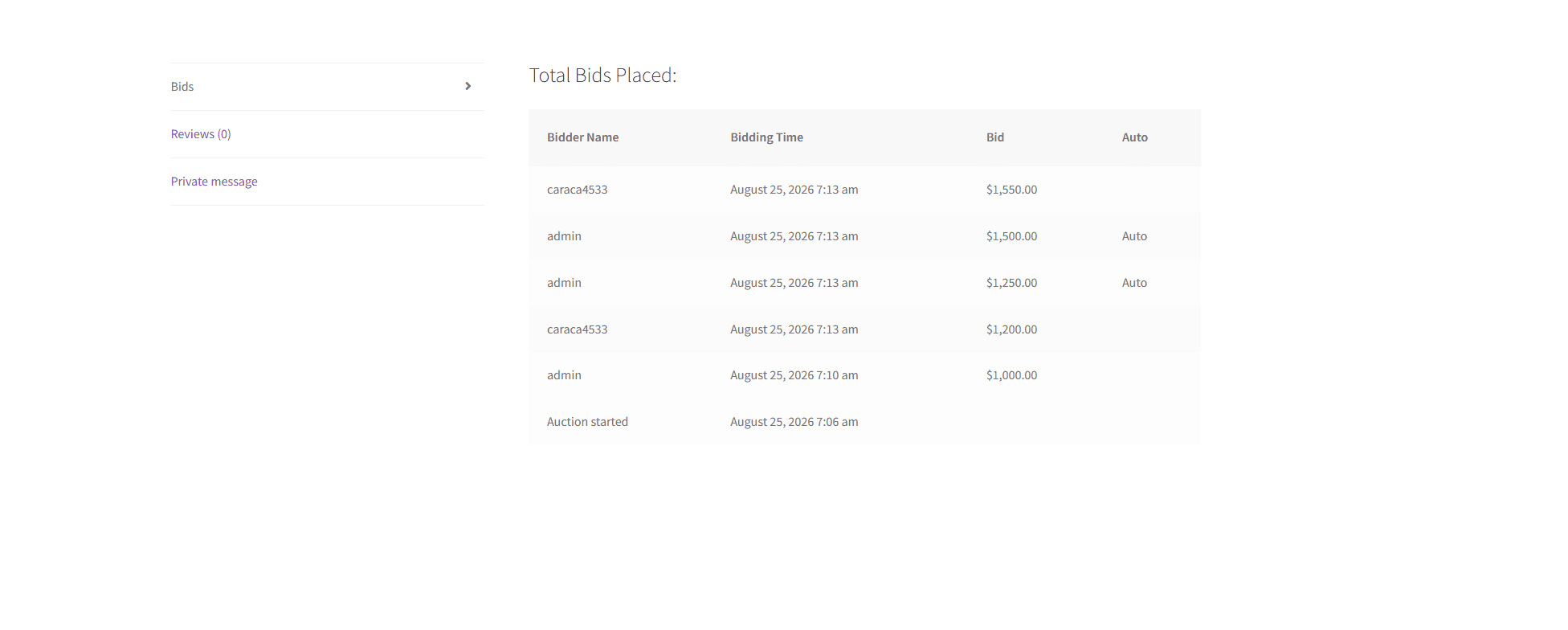
Here’s exactly how it plays out. Say an item’s current bid sits at $50, and you decide you’re willing to go as high as $200. You enter $200 as your max. The system doesn’t show your $200 to anyone or jump straight to it. Instead, it places a bid of $55, just enough to put you in the lead.
Another bidder comes in at $60. The system reacts on its own and raises your bid to $65. They bid $80, you’re bumped to $85. This keeps happening automatically, bid after bid, without you touching anything, right up until either they stop bidding or your bids reach your $200 limit.
If the other bidder is willing to go higher than $200, they win the item once your proxy hits its ceiling. If they stop before $200, you win at whatever the last bid ended up being, not at your full $200 max. That’s the part people usually get wrong: your max is a ceiling, not the price you actually pay.
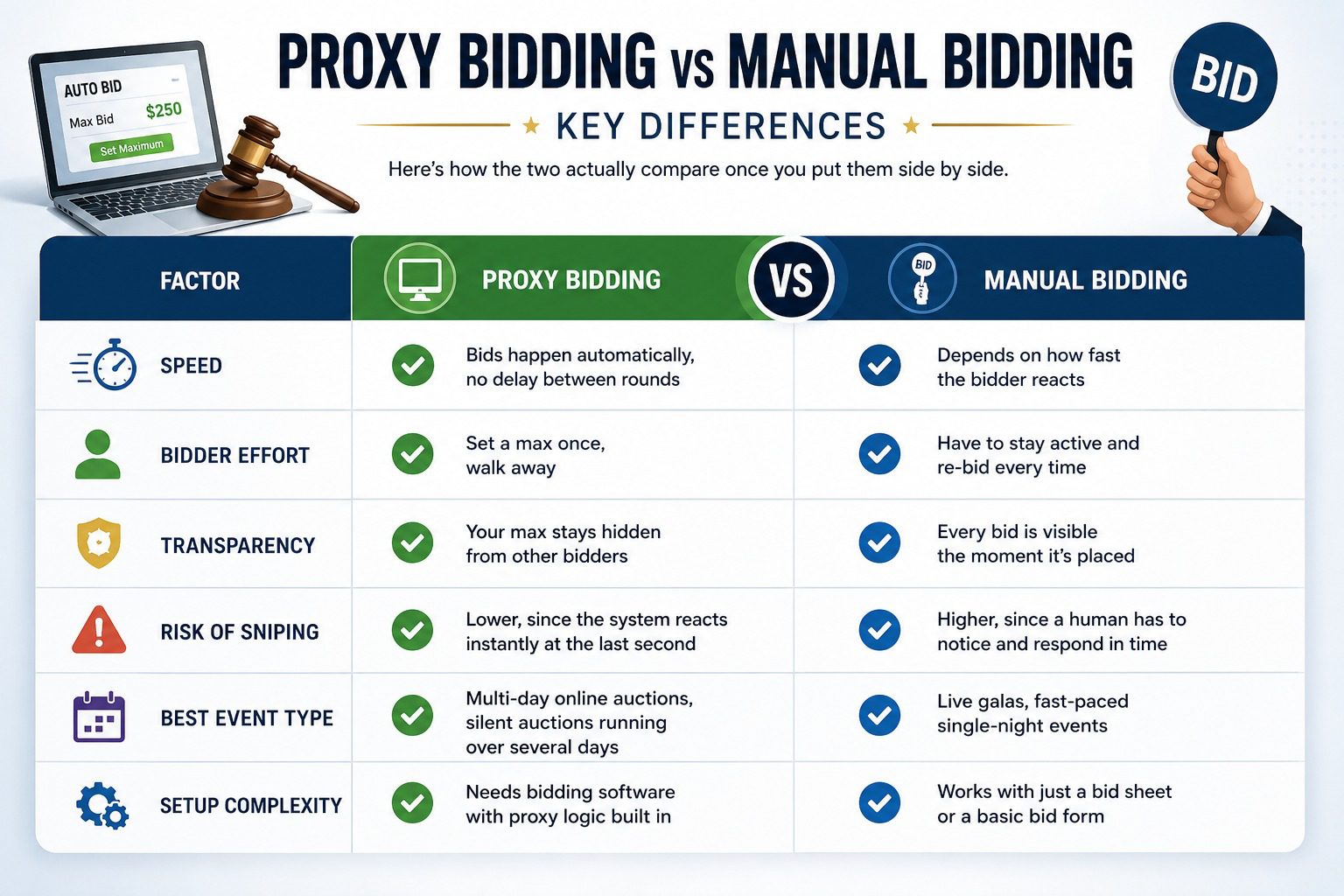
The pattern worth noticing: proxy bidding trades visible drama for consistency, and manual bidding trades consistency for visible drama. Neither wins on every row. It depends which one matters more for your event.
From our experience managing Ultimate Auction Pro sites, proxy bidding is particularly useful for longer-running and fundraiser auctions because bidders do not need to continuously monitor the auction or refresh the page to respond to competing bids. For shorter, single-night or live events, some clients prefer manual bidding because they want to actively monitor the bidding activity and respond in real time, the preferred approach generally depends on the event format and client requirements.
The right choice depends on what kind of event you’re actually running, not which method sounds more modern.
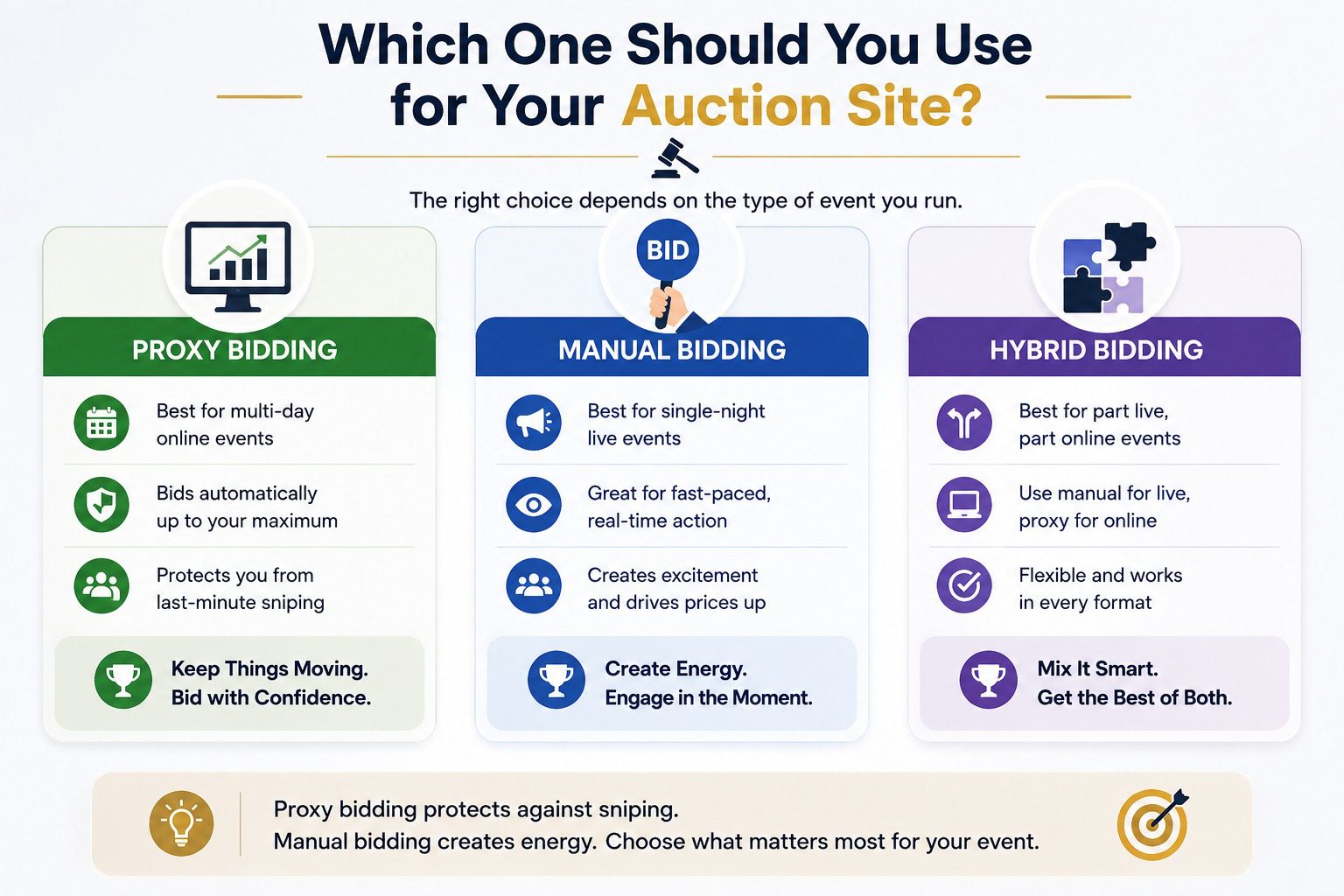
If you’re running a multi-day online fundraiser, go with proxy bidding. When an auction stays open for several days, nobody’s going to sit there refreshing the page waiting to react to every new bid. Proxy bidding keeps things moving on its own, and it protects bidders from getting sniped in the final seconds by someone who was just watching the clock.
If you’re running a single-night live event, manual bidding usually works better. The room is already paying attention. People want to see the number change, react to it, and get pulled into a bit of competition before the item closes. Automating that away takes out the part of the room that actually drives prices up.
If you’re running a hybrid, part live and part online, you can split it by format. Keep manual bidding for anything happening on stage or in front of a crowd, and use proxy bidding for the online portion running alongside it, especially if that portion stays open before or after the live event.
The short version: proxy bidding protects against last-minute sniping and rewards planning ahead. Manual bidding creates energy and rewards people paying attention in the moment. Pick based on which of those two things actually matters for your event.
Yes, and a lot of sites already do this without visitors even realizing it. It usually comes down to how your auction plugin is set up, not some technical limit that forces you to pick one.
The most common setup: proxy bidding runs as the default for every item, since it needs the least effort from bidders and keeps the auction active around the clock. Manual bidding gets turned on for specific high-attention items, like a featured auction piece you want people actively competing over, or for a live event portion running alongside your online auction.
Here’s a real data point worth knowing. eBay, the auction platform most people compare everything else to, runs its entire proxy bidding system on a straightforward rule: when the auction ends, the winner pays the second-highest bidder’s max amount plus one increment, not their own full max. That single rule is why proxy bidding scales so well. It handles a massive volume of bids without needing anyone to manually watch and react to each one, and it still lands on a fair price for both sides.
In Ultimate Auction Pro, the admin first enables proxy bidding site-wide under Auctions → Settings → Auction tab → Proxy Auction Settings → Enable Proxy Bidding.
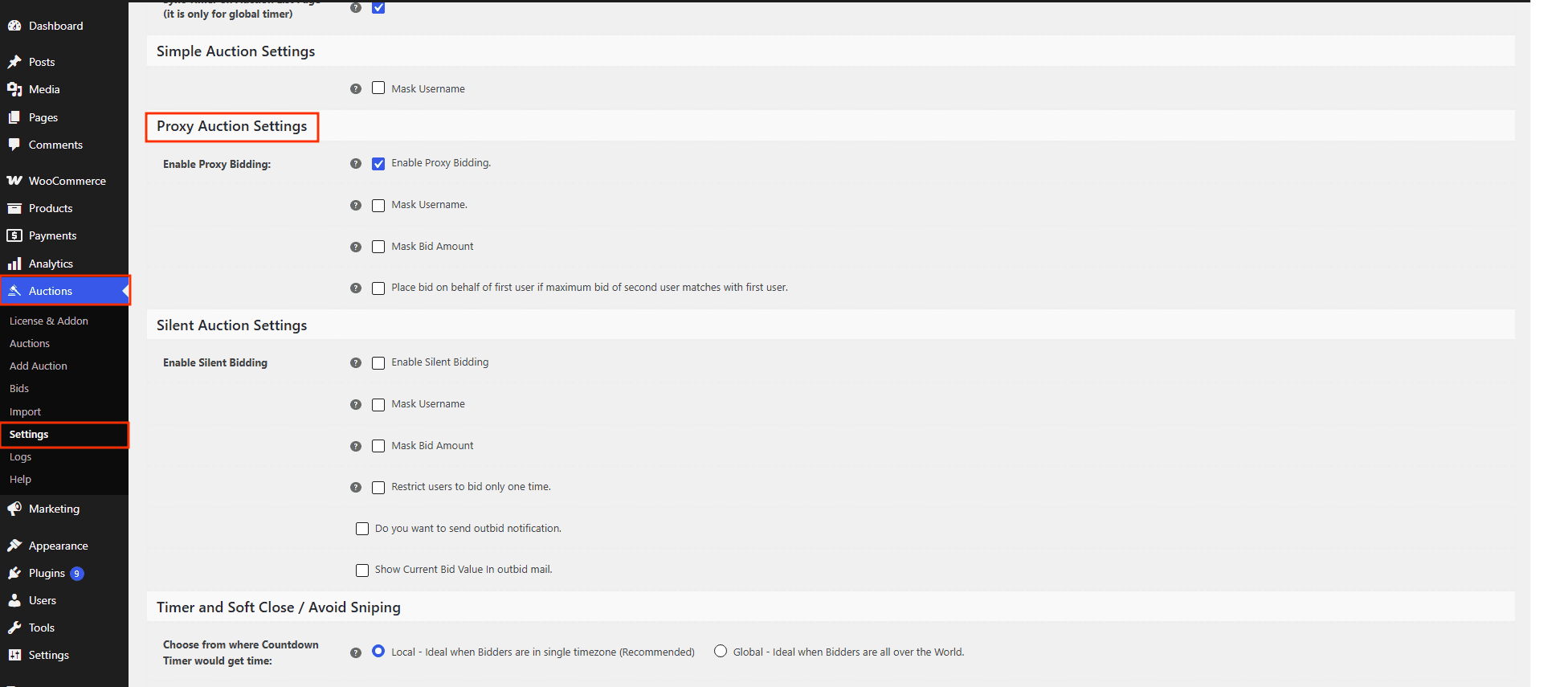
Once enabled, every auction product’s edit page gets its own Proxy Bidding checkbox (enabled by default), so any individual lot can be unticked to run as standard manual bidding instead.
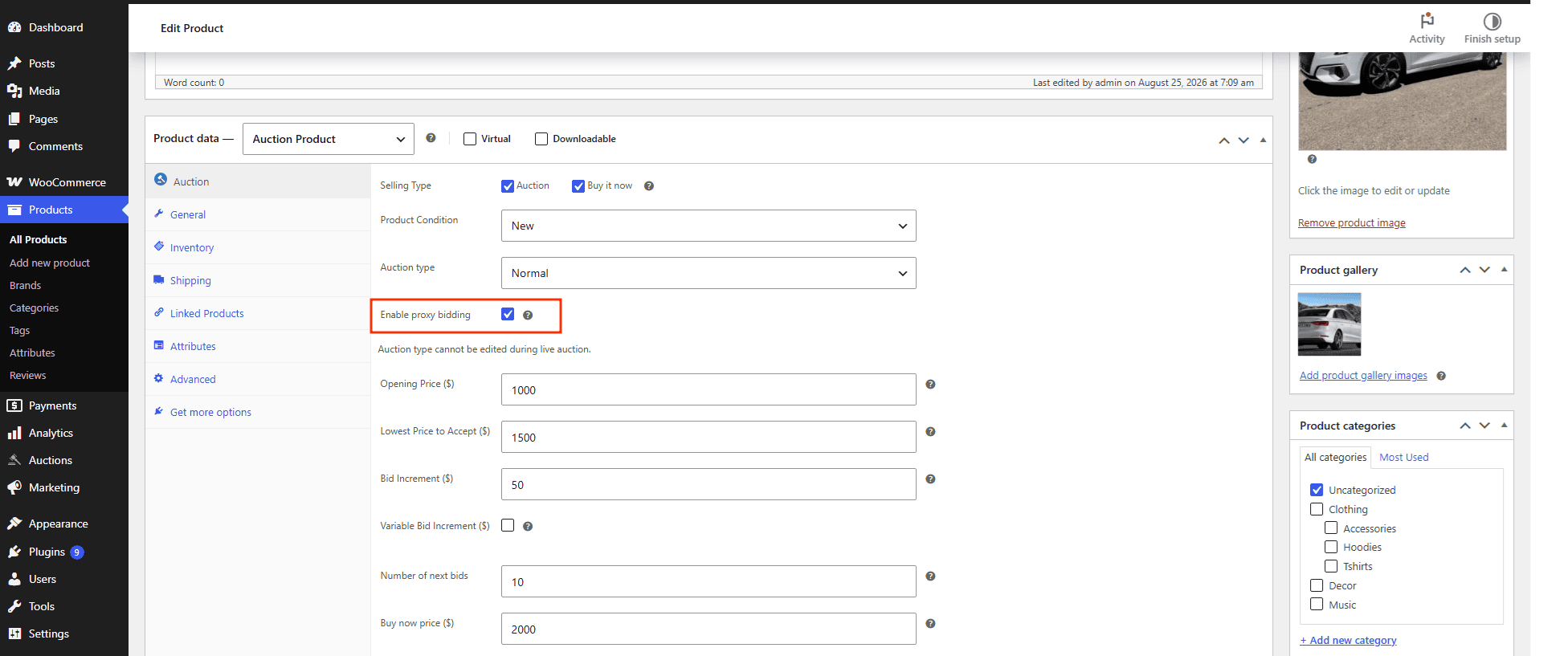
This means you get site-wide control plus per-item flexibility—there’s no per-category toggle, just those two levels.
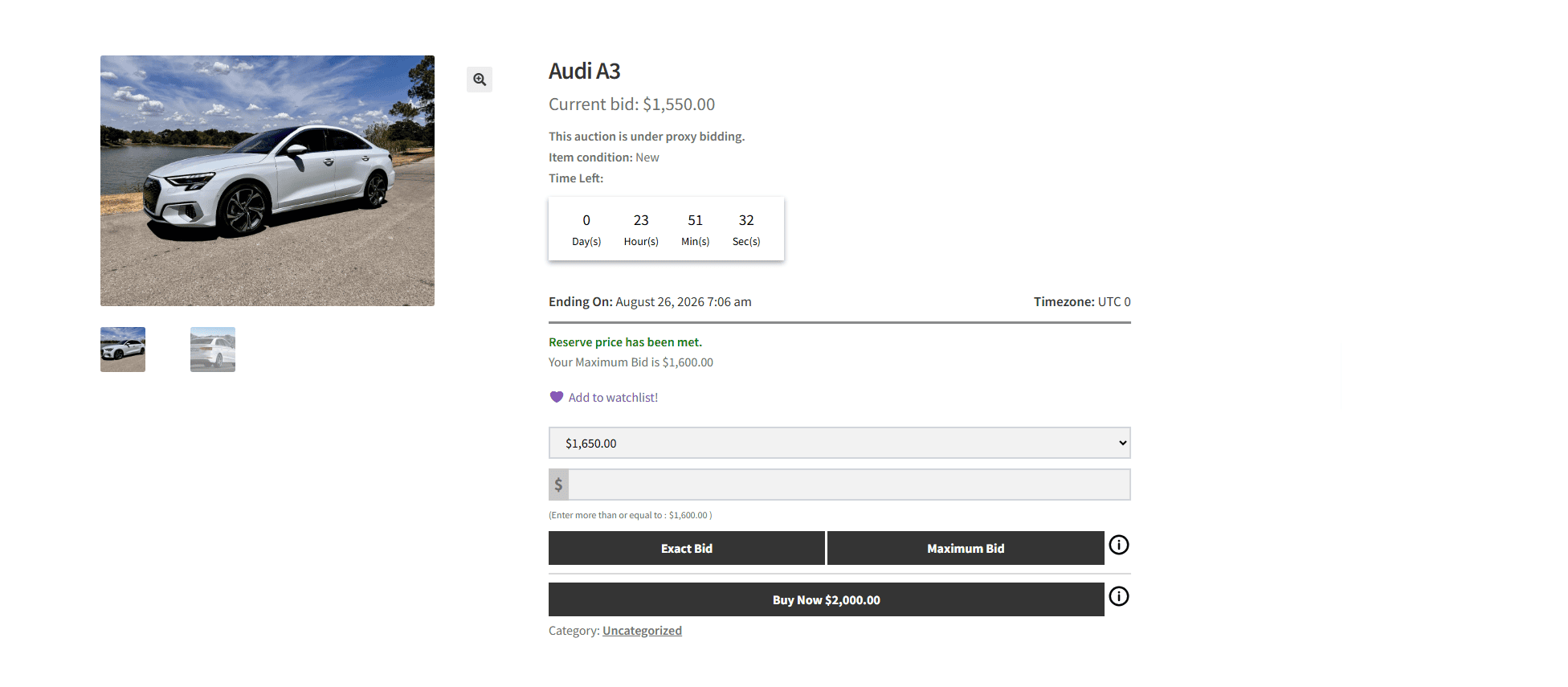
When a lot has proxy enabled, the product detail page displays “This auction is under proxy bidding,” so bidders can instantly tell which method they’re using.
If you’re running a WooCommerce-based auction site, the practical move is to default to proxy bidding for anything running more than a day or two, and reserve manual bidding for short windows where you want bidders paying close attention. Trying to force one method across every auction type usually ends up working against you somewhere.
You don’t need to guess which method fits your event. If your auction runs longer than a day or two, turn on proxy bidding and let it handle the back and forth for you. If it’s a single-night live event, stick with manual bidding and let the room’s energy do the work.
If you’re running your auction through WordPress or WooCommerce, Ultimate Auction Pro supports both, and getting proxy bidding running on your next auction takes a few minutes of setup, not a rebuild of your site.


Nitesh Singh is an e-commerce software architect and the Founder of Inception Software LLP. He has 16+ years of software engineering experience and has been building dedicated auction extensions for the WordPress and WooCommerce ecosystems since 2014. Connect with Nitesh on LinkedIn to track his latest developments in automated bidding tech or read his setup guides on the site.
More articles by Nitesh Singh →


 Easy Setup
 5 Star Support